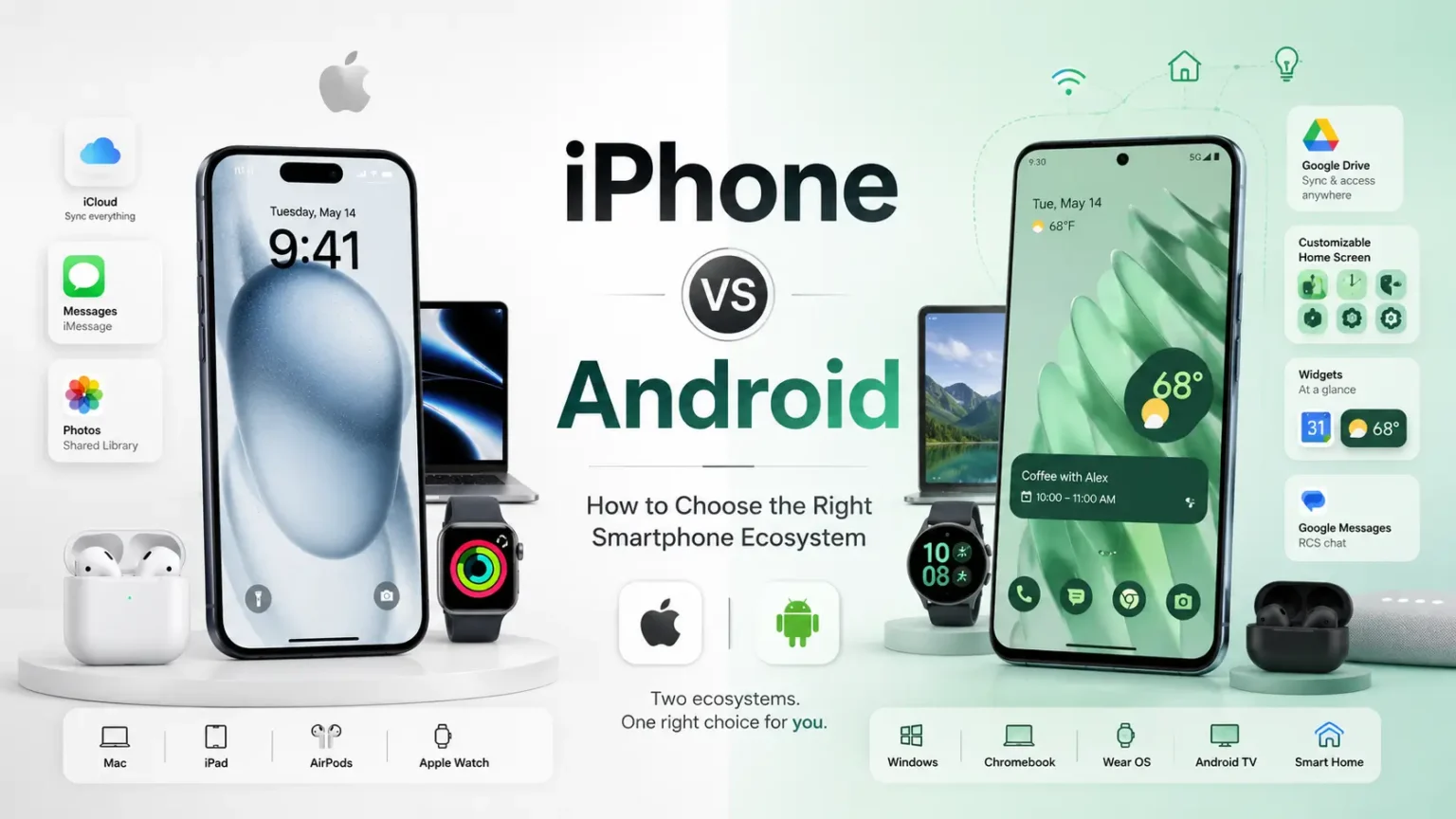
The iPhone versus Android question is one of the most popular smartphone debates because it is not only about hardware. It is about habits, apps, computers, family, photos, messaging, payments, accessories, privacy expectations and the way a device fits into a person’s day. Two people can compare the same phones and reach different conclusions without either person being wrong.
This guide avoids the usual brand-war language. Instead of asking which platform is universally better, it asks which platform is better for a specific kind of user. Some people need the smoothest connection with a Mac, iPad, Apple Watch and family iCloud setup. Others need wide hardware choice, deeper customization, flexible file handling, Google-first services or stronger price variety. Both paths can lead to an excellent phone when the decision is made honestly.
Read this as an ecosystem guide, not a fan argument. By the end, you should understand how iPhone and Android differ in daily use, updates, accessories, apps, privacy, messaging, gaming, work, travel and long-term value. The right answer is the one that reduces friction in your real life.
Table of Contents
- The Real Difference Between iPhone and Android
- Ease of Use and Learning Curve
- Hardware Variety and Price Choice
- Software Updates and Long-Term Support
- App Quality and App Availability
- Privacy Controls and Security Philosophy
- Customization and Personal Workflow
- Messaging, Video Calls and Social Connections
- Photos, Cloud Libraries and Memories
- Smartwatches, Earbuds and Accessories
- Computers, Tablets and Cross-Device Work
- Gaming, Performance and Thermal Behavior
- Battery Life and Charging Differences
- File Management and Openness
- Maps, Assistants and Default Services
- Family Features and Parental Controls
- Accessibility and Comfort
- Resale Value and Upgrade Paths
- Switching From iPhone to Android
- Switching From Android to iPhone
- Which Ecosystem Fits Which Type of User?
- Regional Availability and Local Support
- Privacy Versus Convenience Trade-Offs
- Final Ecosystem Checklist
| Question | iPhone tends to suit | Android tends to suit |
|---|---|---|
| Do you want fewer model choices? | Yes, the lineup is simpler and easier to compare | No, the market offers many brands, prices and designs |
| Do you customize heavily? | Some customization, but within a controlled structure | Deep home screen, default app, launcher and workflow control |
| Do you use Apple Watch or Mac? | Very strong fit | Limited or no Apple Watch support |
| Do you want wide budget options? | Fewer low-cost choices | Many choices from budget to ultra-premium |
| Do you handle local files often? | Works, but more structured | Usually more flexible and direct |
| Do you value resale predictability? | Often strong and consistent | Varies widely by brand and model |
The Real Difference Between iPhone and Android
iPhone is a tightly controlled platform where Apple designs the hardware, operating system, major services and many accessories to work together. Android is a broader platform used by many manufacturers, which creates more variety in size, price, features and software style.
Instead of treating the point as a spec contest, examine the Real Difference Between iPhone and Android with the trade-offs you are willing to accept. A moment such as moving photos between devices gives iPhone or Android ecosystem decision a practical boundary because it shows what the phone must handle without friction. A phone that fits your routine usually feels faster, safer and easier to recommend within this iPhone or Android ecosystem decision. A bargain can become expensive when accessories, repairs or storage upgrades are added when you are working through this iPhone or Android ecosystem decision. The best phone for you should make the answer feel obvious in daily use for the iPhone or Android ecosystem decision.
Turn this into a checklist item by writing down one measurable expectation for the Real Difference Between iPhone and Android. That approach protects both budget and attention for this iPhone or Android ecosystem decision.
Neither approach is automatically better. A controlled platform can feel consistent and predictable, while an open hardware market can offer more choice and unusual features. The decision depends on whether you value simplicity, flexibility, price range, customization or continuity with devices you already own.
The debate often becomes emotional because phones are personal objects. They hold photos, conversations, money, maps, music and work. When a platform fits your habits, it can feel obvious; when it does not, even excellent hardware can feel awkward.
For a device-by-device decision, oursmartphone buying guideexplains how to compare battery, camera, display, storage and updates. This article focuses on the ecosystem choice that shapes those features over time.
Ease of Use and Learning Curve
iPhone is often praised for consistent menus, predictable gestures and a smaller range of hardware differences. That can help people who want the phone to behave the same way for years without much setup or personalization.
The buyer-friendly view starts by asking what ease of Use and Learning Curve beside the accessories and services you already own. Think about sharing messages with family: that everyday scene exposes whether iPhone or Android ecosystem decision is useful or merely attractive on a spec sheet. The better option is the one that makes the fewest demands on your patience within this iPhone or Android ecosystem decision. Do not treat future promises as equal to support that is already clear when you are working through this iPhone or Android ecosystem decision. That is how a technical category becomes a practical buying decision for the iPhone or Android ecosystem decision.
A useful next step is to compare two models side by side and focus only on ease of Use and Learning Curve. It gives the feature a job and removes the pressure to chase every upgrade for this iPhone or Android ecosystem decision.
Android varies more because Samsung, Google, Motorola, OnePlus, Xiaomi and other brands each add their own design choices. This variety can be exciting for users who enjoy control, but it can also create a learning curve when switching between brands.
Ease of use is not only about simplicity. A customizable phone can become easier once you arrange home screens, shortcuts, widgets and default apps around your routine. A simple phone can become frustrating if it prevents a workflow you care about.
The best test is whether you can complete your common tasks without thinking: search, pay, call, share, scan, navigate, edit photos, manage files and silence notifications. The platform that makes those actions feel natural is the easier platform for you.
Hardware Variety and Price Choice
Android offers a much wider range of devices, from budget models to foldables, gaming phones, camera-focused phones, rugged designs and large-battery models. This variety allows buyers to prioritize one feature without paying for everything else.
A realistic comparison should put hardware Variety and Price Choice through comfort after the first month. When using a laptop and tablet together is part of your week, iPhone or Android ecosystem decision should make the task smoother rather than more complicated. A spec sheet can narrow the field, but real use should make the final call within this iPhone or Android ecosystem decision. A small annoyance can become a daily frustration when the phone is used for years when you are working through this iPhone or Android ecosystem decision. The more clearly you define the need, the less persuasive empty marketing becomes for the iPhone or Android ecosystem decision.
Do not try to solve every possible future need; decide what hardware Variety and Price Choice must do for the next two or three years. This is especially important in the smartphone market, where many good devices differ only in details for this iPhone or Android ecosystem decision.
iPhone offers fewer models, but the lineup is easier to understand. You choose among sizes, camera tiers, storage and generation. For many buyers, that clarity reduces research time and lowers the risk of choosing a confusing model.
Price flexibility is one of Android’s biggest strengths. A careful Android buyer can find strong battery life, bright screens, fast charging or good cameras at several price levels. The challenge is identifying which models also provide long software support and reliable quality control.
Apple’s strength is consistency across fewer devices. Accessories, cases, repair expectations and software behavior are easier to predict. Buyers who prefer a simpler menu of premium options may find that less stressful than searching through dozens of Android models.
Software Updates and Long-Term Support
Updates matter because they protect security, add features, improve compatibility and extend the useful life of the phone. iPhone has traditionally been strong in long support across many models, while leading Android brands have become much more competitive with longer update promises.
The most reliable shortcut is to test software Updates and Long-Term Support against durability, updates and repair options. Use installing work apps as a reality check, since small inconveniences in that situation often reveal weak ownership fit. Long-term satisfaction comes from matching the device to behavior, not from chasing every novelty within this iPhone or Android ecosystem decision. Avoid overvaluing features that only matter in rare situations when you are working through this iPhone or Android ecosystem decision. This keeps the purchase connected to value rather than novelty for the iPhone or Android ecosystem decision.
If two devices are close, let software Updates and Long-Term Support break the tie only when the difference is visible in real use. It helps the article stay useful long after individual models are replaced for this iPhone or Android ecosystem decision.
The practical question is not only how many years are promised, but how quickly and reliably updates arrive. Some Android brands update flagship models faster than budget models, while iPhone updates generally arrive across supported devices at the same time.
Long support can save money. A phone that remains secure and compatible for more years delays replacement and improves resale value. This matters especially for buyers who keep phones until they are truly worn out.
Before choosing any phone, check the update policy for that exact model and region. A platform reputation is helpful, but the specific device still matters.
App Quality and App Availability
Most major apps exist on both iPhone and Android, so ordinary users can message, bank, stream, navigate, shop and work on either platform. The differences appear in polish, release timing, subscription behavior, tablet support, widgets and integration with system features.
Think about this part through the lens of app Quality and App Availability with real photos, messages, maps, calls and payments. Picture paying with a wallet service before you compare prices, because a phone that fails there can feel disappointing quickly. The simplest comparison is often the most honest because it reveals what you truly need within this iPhone or Android ecosystem decision. Do not let brand familiarity replace a fresh look at your current needs when you are working through this iPhone or Android ecosystem decision. The same logic works whether you buy new, used, refurbished or on contract for the iPhone or Android ecosystem decision.
Readers who buy carefully should give app Quality and App Availability a clear pass-or-fail test before looking at color or storage upgrades. That is a more durable method than memorizing brand claims for this iPhone or Android ecosystem decision.
Some creative, social and finance apps may launch features earlier on iPhone because developers can optimize for fewer devices. Android’s enormous reach, however, means Google services, file tools, customization utilities and regional apps can be excellent.
Paid apps and subscriptions should be considered before switching. If you purchased apps, storage plans or in-app tools on one platform, check whether they transfer. Some services are account-based, while others are tied to the app store.
App comfort is personal. The best platform is the one where your essential apps feel stable, receive updates and fit your workflow. A theoretical advantage is less important than how your actual apps behave.
Privacy Controls and Security Philosophy
Apple emphasizes a controlled environment, permission prompts, on-device processing where possible and privacy-focused branding. Google emphasizes account controls, security scanning, permission dashboards and deep integration with cloud services. Both platforms have improved user-facing privacy tools.
A stronger decision comes from linking privacy Controls and Security Philosophy beside the hidden costs that appear later. A practical example like setting default apps is better than abstract debate because it connects iPhone or Android ecosystem decision with real behavior. A device is easier to keep when its compromises are known before purchase within this iPhone or Android ecosystem decision. A phone that looks exciting today should still make sense after a year of ordinary use when you are working through this iPhone or Android ecosystem decision. A decision made this way is easier to trust after the excitement fades for the iPhone or Android ecosystem decision.
A practical notes app entry can help: list what would improve, what would stay the same and what might get worse around privacy Controls and Security Philosophy. It turns the section into action instead of background information for this iPhone or Android ecosystem decision.
The difference is often philosophical. iPhone tends to limit certain types of customization in exchange for consistency and control. Android allows more flexibility, which can be powerful but also asks the user to be more careful with permissions, app sources and settings.
Security depends on user behavior too. A fully updated Android phone from a trusted brand can be very secure, while an iPhone can still be weakened by poor passwords, phishing, suspicious profiles or careless app permissions.
Choose the platform whose privacy controls you will actually use. Clear settings, regular updates and good account hygiene matter more than assuming one logo automatically protects every mistake.
Customization and Personal Workflow
Android is the stronger platform for customization. Users can change launchers, default apps, home screen layouts, widgets, file managers, notification behavior and many visual details. This makes Android appealing to people who enjoy shaping the phone around their habits.
Before giving extra weight to a model, check customization and Personal Workflow through how easily someone else could use the phone. If using a smartwatch already matters to you, the phone should support it confidently without forcing awkward workarounds. The most persuasive advantage is the one you would notice without being reminded within this iPhone or Android ecosystem decision. Do not confuse customization with convenience; the better option depends on how much setup you enjoy when you are working through this iPhone or Android ecosystem decision. It gives each feature a job instead of treating every upgrade as equally important for the iPhone or Android ecosystem decision.
The smartest choice is often the phone that makes customization and Personal Workflow boring, predictable and easy to forget about. This makes the advice practical for budget, midrange and flagship shoppers for this iPhone or Android ecosystem decision.
iPhone customization has grown over time, but it remains more guided. The advantage is that the system usually feels cohesive and consistent. The disadvantage is that certain workflows may require Apple’s way rather than your preferred way.
Customization is not only cosmetic. It can reduce steps, surface important information, automate repetitive actions and make a large phone easier to operate. A well-designed Android setup can feel extremely personal and efficient.
Some users do not want to design their phone. They want it to work cleanly out of the box. For them, iPhone’s controlled experience can be a strength rather than a limitation.
Messaging, Video Calls and Social Connections
Messaging habits can strongly influence platform choice. In some regions and friend groups, iMessage, FaceTime and Apple group chats create a social advantage for iPhone users. In other places, WhatsApp, Telegram, Messenger or regional apps make the platform almost irrelevant.
The detail deserves attention when it changes messaging, Video Calls and Social Connections against the storage, battery and security habits you maintain. The value of iPhone or Android ecosystem decision becomes easier to see when it is tested against joining group chats. Practical value appears when the feature solves an inconvenience you have already experienced within this iPhone or Android ecosystem decision. A bigger number can still produce a worse experience if the implementation is weak when you are working through this iPhone or Android ecosystem decision. That is especially useful in a market where good phones often look very similar for the iPhone or Android ecosystem decision.
When you read reviews, search for long-term comments about messaging, Video Calls and Social Connections instead of relying only on launch impressions. It prevents one impressive number from taking control of the whole decision for this iPhone or Android ecosystem decision.
Video calling also depends on the people you contact. FaceTime is easy inside the Apple ecosystem, while Google Meet, WhatsApp, Zoom and other apps work across platforms. The best choice is the one your family, clients or classmates actually use.
Media sharing can feel different. Compression, shared albums, live photos, reactions and group chat behavior may affect how convenient the phone feels in daily communication. These small social details can matter more than a processor upgrade.
Before switching platforms, think about the conversations you cannot afford to disrupt. Your phone is a social tool, and the best ecosystem is often the one that keeps your important connections effortless.
Photos, Cloud Libraries and Memories
Both platforms can take excellent photos, but the ecosystem around those photos differs. iPhone works closely with iCloud Photos, shared albums, AirDrop and Apple devices. Android often pairs naturally with Google Photos, Drive, Gmail and cross-device web access.
A practical owner should judge photos, Cloud Libraries and Memories with the way you travel, work and relax. A scenario such as backing up memories prevents overbuying because it keeps attention on what the phone must actually do. The final decision should reward reliability, clarity and support as much as excitement within this iPhone or Android ecosystem decision. Avoid judging the device in isolation when it will be used with apps, chargers, watches and cloud services when you are working through this iPhone or Android ecosystem decision. The point is to reduce uncertainty before money changes hands for the iPhone or Android ecosystem decision.
If you are buying for someone else, ask how photos, Cloud Libraries and Memories affects their routine rather than projecting your own preferences. That is how a buyer avoids paying for someone else’s priorities for this iPhone or Android ecosystem decision.
If your family uses shared iCloud albums, Apple TV, Macs and iPads, iPhone photo management may feel seamless. If you use Google Photos across many devices and platforms, Android can feel more flexible and easier to access from anywhere.
Cloud storage cost matters. A phone ecosystem can become expensive when high-resolution photos and videos push you into larger storage plans. Compare storage plans, sharing features and export options before committing.
Memories are one of the hardest things to move. Before switching, make sure you understand how to transfer original files, albums, timestamps, edits and shared libraries. A platform switch should never put your photo history at risk.
Smartwatches, Earbuds and Accessories
Accessories can lock people into an ecosystem more strongly than the phone itself. Apple Watch works with iPhone, while many Android watches are designed for Android-first experiences. Earbuds, trackers, wallets, tags and chargers can also favor one side.
The safest interpretation is to compare smartwatches, Earbuds and Accessories beside the limits of your current device. For many readers, gaming with a controller is the kind of ordinary use that separates a smart purchase from a regretted one. Small ownership costs become important when you multiply them across several years within this iPhone or Android ecosystem decision. Do not overlook privacy and security settings; they affect trust as much as performance when you are working through this iPhone or Android ecosystem decision. A clear priority list is the best defense against buyer’s remorse for the iPhone or Android ecosystem decision.
A store demo can be useful, but it should not replace a realistic question about smartwatches, Earbuds and Accessories. It keeps the shortlist small enough to evaluate honestly for this iPhone or Android ecosystem decision.
AirPods work best with Apple devices because pairing, switching and settings are deeply integrated. Many Android earbuds offer similar convenience on Android, especially when paired with the same brand family. The gap is not always about sound; it is about daily friction.
Case availability, repair parts, screen protectors and car mounts tend to be easier for popular models. iPhone has a strong accessory market, while major Android flagships also have good support. Niche Android phones may be harder to accessorize.
Before switching, list the accessories you already own. A cheaper phone can become expensive if it forces you to replace a watch, earbuds, chargers, car mounts and family tracking devices.
Computers, Tablets and Cross-Device Work
iPhone pairs especially well with Mac and iPad for features like shared clipboard, AirDrop-style file movement, messaging from a computer and continuity between devices. For people already living in that setup, the phone becomes part of a larger workspace.
A smarter shortlist uses computers, Tablets and Cross-Device Work through the benefits you can explain without hype. Consider charging across several devices carefully; it can reveal battery limits, comfort issues, software friction or missing features. A phone should reduce daily friction instead of giving you a new list of things to manage within this iPhone or Android ecosystem decision. A beautiful screen or camera cannot compensate for a phone that feels uncomfortable to carry when you are working through this iPhone or Android ecosystem decision. This makes the guide useful for both first-time buyers and experienced upgraders for the iPhone or Android ecosystem decision.
Think about the cost of being wrong on computers, Tablets and Cross-Device Work; if the downside is high, choose the safer option. This turns research into a decision instead of another source of confusion for this iPhone or Android ecosystem decision.
Android pairs naturally with Google accounts, Chromebooks, Windows integrations, web services and many file systems. Some Android brands also provide desktop modes, advanced phone-to-PC features and strong Windows companion apps.
Students and remote workers should consider how files move between phone and computer. Screenshots, PDFs, signed documents, scanned receipts and videos often need to travel quickly. A platform that makes this painless can save time every week.
The best ecosystem for work is the one that supports your actual devices. A great phone is less useful when it adds friction to the laptop, tablet, browser and cloud services you already rely on.
Gaming, Performance and Thermal Behavior
Both iPhone and premium Android phones can deliver excellent mobile gaming performance. iPhone benefits from strong chips and optimized game support, while Android offers gaming-focused hardware, high-refresh displays, large batteries, cooling accessories and performance modes.
The value question is whether gaming, Performance and Thermal Behavior against the problems that would make you regret the purchase. The best way to judge iPhone or Android ecosystem decision is to connect it with a real habit like copying files for work. The best evidence is not always technical; sometimes it is how calmly the device fits your life within this iPhone or Android ecosystem decision. Do not assume every user in a family or team needs the same device when you are working through this iPhone or Android ecosystem decision. It also helps you explain the purchase to someone else without relying on hype for the iPhone or Android ecosystem decision.
A phone that handles gaming, Performance and Thermal Behavior well can feel more premium than a device with a louder headline feature. It also makes later resale, repair and support decisions easier for this iPhone or Android ecosystem decision.
Android’s variety is useful for gamers because some models are built around cooling, triggers, big batteries and fast charging. iPhone’s advantage is consistent performance across a narrower set of devices and strong developer optimization.
Thermal behavior matters more than peak performance. A phone that stays comfortable and stable during a long match or emulator session may be better than one with a higher short benchmark score.
Game libraries, controller support, cloud gaming, storage and screen size should also shape the choice. Serious gaming is a full workflow, not just a chip comparison.
Battery Life and Charging Differences
Android phones often offer a wider range of battery sizes and fast-charging systems. Some models focus heavily on all-day or multi-day endurance, while others prioritize thin designs. iPhone relies on tight hardware-software optimization and consistent power management.
A calm buying process turns battery Life and Charging Differences with a full ownership cycle in mind. A phone can look excellent in a review but still struggle with something as routine as using maps in a new city. A useful upgrade should make old frustrations feel solved, not merely postponed within this iPhone or Android ecosystem decision. A generous feature list is less valuable when the essentials feel inconsistent when you are working through this iPhone or Android ecosystem decision. The final choice should feel practical, not pressured for the iPhone or Android ecosystem decision.
If battery Life and Charging Differences is not important to you, admit that and spend the money where it will matter more. That way, the phone is judged by ownership value rather than launch excitement for this iPhone or Android ecosystem decision.
Charging convenience depends on routine. Fast wired charging is useful for busy users, while wireless charging and accessory ecosystems can be more important for desk or bedside use. The best charging system is the one that fits where you actually spend time.
Battery aging affects both platforms. Heat, constant full charges, deep drains and heavy gaming can reduce long-term comfort. Platform choice does not remove the need for good habits.
For a complete maintenance approach, see our guide tomaking a smartphone last longer, which covers battery health, storage, backups, physical protection and update habits.
File Management and Openness
Android usually offers more direct file access, easier USB transfers, broader default app control and more flexibility with downloads. This can be valuable for people who handle documents, media libraries, emulators, work files or local backups.
A long-term owner benefits by measuring file Management and Openness beside the reason you started shopping in the first place. When you imagine managing children’s devices, you can usually tell which features deserve money and which ones are distractions. The right device feels coherent: hardware, software, services and support work in the same direction within this iPhone or Android ecosystem decision. Do not wait for perfection if your current phone is already hurting productivity or safety when you are working through this iPhone or Android ecosystem decision. This is where evergreen smartphone advice earns its value for the iPhone or Android ecosystem decision.
A balanced decision gives file Management and Openness enough attention without letting it overwhelm the entire purchase. It is a simple habit, but it prevents many common upgrade mistakes for this iPhone or Android ecosystem decision.
iPhone file management has improved, but it remains more structured around apps, iCloud and Apple-approved workflows. For many users that structure is cleaner; for others it can feel restrictive.
Openness can be powerful when you know what you want. It can also create clutter when files scatter across downloads, messaging apps and storage folders. Freedom works best with organization.
People who frequently move files between devices should test the process before switching. The everyday reality of file movement can matter more than a feature list.
Maps, Assistants and Default Services
Google services are deeply integrated with Android and available on iPhone as apps. Apple services are most integrated on iPhone and less available outside Apple devices. This creates a practical difference in maps, reminders, calendars, voice assistants and cloud behavior.
The everyday test is simple: watch how maps, Assistants and Default Services through the small details that influence daily comfort. A realistic test such as turning on accessibility tools keeps the recommendation grounded in ownership rather than hype. A feature that looks minor may matter if it affects something you do dozens of times a day within this iPhone or Android ecosystem decision. Avoid upgrading out of boredom when a battery replacement, cleanup or case could solve the real issue when you are working through this iPhone or Android ecosystem decision. A thoughtful choice usually lasts longer than an impulsive one for the iPhone or Android ecosystem decision.
The right priority level for maps, Assistants and Default Services depends on frequency, frustration and the cost of fixing a mistake later. This is the type of thinking that makes evergreen smartphone advice useful for this iPhone or Android ecosystem decision.
If you rely on Gmail, Google Calendar, Google Photos, Drive and Chrome, Android may align naturally with your account. If you rely on iCloud, Apple Notes, Safari, Apple Calendar and Apple Reminders, iPhone will usually feel smoother.
Voice assistants are another consideration. Some users barely use them, while others rely on hands-free timers, messages, smart home control, navigation and reminders. Test the assistant tasks you actually use.
Default services shape tiny moments throughout the day. The best platform should reduce app switching and account friction rather than forcing you to rebuild familiar routines.
Family Features and Parental Controls
Families should compare screen time tools, purchase approvals, location sharing, content restrictions, shared subscriptions and emergency features. A phone choice affects parents, children and shared budgets, not just the individual user.
A good review habit is to translate family Features and Parental Controls against flashy upgrades that do not solve a problem. Use selling the phone later to decide whether this part of the phone saves time, reduces stress or improves confidence. A model that looks similar on paper can feel very different once weight, heat and battery behavior are considered within this iPhone or Android ecosystem decision. A device that is hard to repair may be harder to keep, even if it feels premium on day one when you are working through this iPhone or Android ecosystem decision. That is the foundation of a phone purchase that ages well for the iPhone or Android ecosystem decision.
Use ownership time as the frame: family Features and Parental Controls should make sense after six months, not only during the first setup. It lets the reader choose with confidence even when new models appear for this iPhone or Android ecosystem decision.
Apple’s family features can be very convenient when everyone uses Apple devices. Android and Google Family Link can be strong for households using Google accounts, Chromebooks and mixed-price Android phones.
Children’s phones should be judged by durability, repair cost, controls, battery life and ease of replacement. Buying the same platform as the parent may simplify support, but budget and responsibility level still matter.
Family ecosystem decisions are easier when you think ahead. The first phone can influence future purchases, shared subscriptions, photo libraries and accessory choices for years.
Accessibility and Comfort
Accessibility features can be decisive for users with vision, hearing, motor or cognitive needs. Both iPhone and Android include strong accessibility tools, but the exact behavior and ease of setup can differ.
The most useful comparison asks where accessibility and Comfort with future software support included. The more often you deal with switching from an old platform, the more weight this section should have in your decision. The safest choice is often the one with fewer weak spots rather than one spectacular advantage within this iPhone or Android ecosystem decision. Do not let trade-in offers rush a decision you have not compared carefully when you are working through this iPhone or Android ecosystem decision. When this point passes that test, it deserves a place in the final comparison for the iPhone or Android ecosystem decision.
A good comparison removes emotion from accessibility and Comfort by connecting it to a specific task or pain point. That gives the purchase a stronger reason than boredom or trend pressure for this iPhone or Android ecosystem decision.
Large text, screen readers, live captions, hearing aid support, emergency features, voice control, touch accommodations and simplified modes should be tested before purchase. A feature list is not enough if the setting is hard to use.
Comfort also includes haptics, speaker clarity, display readability, button placement and one-handed operation. These physical details influence accessibility even when they are not labeled as accessibility features.
Choose the platform and device that makes the user more independent. The best phone is the one that reduces barriers, not the one with the longest spec sheet.
Resale Value and Upgrade Paths
iPhones often hold resale value well because the lineup is predictable, software support is long and demand is broad. Popular Android flagships can also retain value, but resale varies widely by brand, model, region and update policy.
A careful shopper should separate resale Value and Upgrade Paths beside the cost of cases, chargers and cloud services. A practical comparison should include learning new gestures, because repeated use exposes weaknesses that launch events skip. A practical comparison rewards the phone that keeps ordinary tasks smooth within this iPhone or Android ecosystem decision. A short-term deal should not override long-term usability when you are working through this iPhone or Android ecosystem decision. When it fails that test, it should move lower on the priority list for the iPhone or Android ecosystem decision.
If a phone asks for compromise on resale Value and Upgrade Paths, make sure it gives you something more valuable in return. It helps the final phone feel intentional rather than accidental for this iPhone or Android ecosystem decision.
Android can offer better initial discounts, which may offset resale differences. A lower purchase price with moderate resale can still be a smart financial decision if the total cost of ownership is favorable.
Upgrade paths matter. Apple users may trade into another iPhone easily, while Android users can choose many brands and price points. Flexibility can be valuable when your budget or needs change.
Keep condition, storage tier, warranty records and accessories in mind. Resale is not only about platform; it is also about how well the phone was cared for.
Switching From iPhone to Android
Moving from iPhone to Android is easiest when you prepare before selling the old device. Back up photos, export important files, turn off platform-specific locks, check messaging settings and make sure passwords are stored somewhere you can access.
The phone that makes sense is usually the one where switching From iPhone to Android through a realistic mix of work and personal use. The detail becomes meaningful when it improves a familiar situation such as choosing local repair support. Look for evidence in repeatable ownership moments, not in a single impressive number within this iPhone or Android ecosystem decision. Be careful with claims that sound universal, because every buyer values compromises differently when you are working through this iPhone or Android ecosystem decision. That habit keeps the purchase focused on ownership instead of noise for the iPhone or Android ecosystem decision.
The best evergreen advice is to keep switching From iPhone to Android tied to behavior, because models and marketing names change. This keeps technical details connected to everyday life for this iPhone or Android ecosystem decision.
Expect a short adjustment period. Notifications, settings, sharing menus, keyboard behavior, app stores and gestures may feel unfamiliar at first. That does not mean the switch was wrong; it means muscle memory is changing.
Check paid apps, subscriptions, health data, watch compatibility and chat history. Some items transfer easily, while others require specific tools or manual steps. Planning prevents surprises.
The biggest benefit of switching to Android is choice. Use that choice intentionally by selecting the brand, size, camera style, battery profile and software design that motivated the switch in the first place.
Switching From Android to iPhone
Moving from Android to iPhone can feel refreshing if you want consistent software, strong accessory support and closer integration with Apple devices. The setup process is straightforward when contacts, calendars, photos and passwords are prepared.
A practical checklist gives switching From Android to iPhone against your tolerance for size, weight and maintenance. A buyer who thinks about balancing privacy and convenience is less likely to be distracted by features that never affect daily use. A specification is helpful only when it explains a real improvement you can feel within this iPhone or Android ecosystem decision. Do not let one impressive feature hide a weakness you would notice every day when you are working through this iPhone or Android ecosystem decision. This approach makes the article useful even as specific phone models change for the iPhone or Android ecosystem decision.
Ask whether switching From Android to iPhone will still matter when the device is older, slower and outside the excitement window. It also respects the fact that different users need different compromises for this iPhone or Android ecosystem decision.
Expect differences in default apps, file movement, notification behavior and customization. Some Android habits have direct iPhone equivalents, while others require a new routine.
Check Google services before switching. Gmail, Google Photos, Maps, Drive and Chrome work on iPhone, but they may not feel as deeply integrated as on Android. Decide whether that matters to your day.
The biggest benefit of switching to iPhone is predictability. If that is what you want, avoid trying to recreate every Android workflow exactly and learn the strengths of the new system.
Which Ecosystem Fits Which Type of User?
Choose iPhone if you value a controlled experience, long support, strong resale, Apple Watch, Mac integration, simple model choices and a consistent accessory market. It is especially comfortable for users already invested in Apple devices.
The best answer often appears when you match which Ecosystem Fits Which Type of User? with the expectation that the phone will age. The phone should make syncing passwords feel easier, safer or more reliable before this point becomes a priority. Reviews are more useful when they describe behavior over time instead of only first impressions within this iPhone or Android ecosystem decision. Avoid comparing devices only at their best; think about how they behave when storage is full or the battery is low when you are working through this iPhone or Android ecosystem decision. It also helps evergreen advice stay relevant across different brands and price ranges for the iPhone or Android ecosystem decision.
A feature related to which Ecosystem Fits Which Type of User? deserves priority when it protects time, money, privacy or comfort. That is the most honest way to compare modern smartphones for this iPhone or Android ecosystem decision.
Choose Android if you value hardware variety, broader price ranges, customization, flexible file handling, fast-charging options, unusual form factors or deeper Google service integration. It is especially strong for users who want the phone to adapt to them.
Choose based on the next three years, not the next three days. A platform becomes more important as photos, accessories, subscriptions, passwords and routines accumulate.
The winner is the ecosystem that makes your ordinary life easier. That may sound less dramatic than a brand battle, but it is the only answer that remains useful after the purchase excitement fades.
Regional Availability and Local Support
Platform choice can feel different depending on country, carrier support, repair networks, payment systems and popular messaging apps. A phone that is easy to service in one market may be inconvenient in another, especially when replacement parts, warranty handling or official support are limited.
A confident decision comes from seeing how regional Availability and Local Support beside the habits you are unlikely to change. A concrete case like using cloud notes helps turn vague preferences into a clear buying requirement. The strongest signal is consistent convenience across several small tasks within this iPhone or Android ecosystem decision. A low price is not automatically value if the phone needs replacing sooner than expected when you are working through this iPhone or Android ecosystem decision. The goal is not to find a perfect device, but to find a phone with the right compromises for the iPhone or Android ecosystem decision.
If your current phone already handles regional Availability and Local Support well, the upgrade must justify itself elsewhere. It keeps the recommendation focused on the user, not the marketing cycle for this iPhone or Android ecosystem decision.
Android’s variety can be a strength in regions with many price-sensitive buyers because there are more local models, promotions and carrier bundles. iPhone’s strength may be stronger resale demand and a broad accessory market, but the purchase price can be higher.
Mobile payments, eSIM support, emergency features and warranty rules should be checked locally. A feature mentioned in a global review may not work the same way in every country or on every carrier.
Before choosing a platform, look at the phones people around you use successfully. Local repair shops, accessory shelves, carrier plans and second-hand demand reveal practical ecosystem realities that spec sheets do not show.
Privacy Versus Convenience Trade-Offs
Every ecosystem balances privacy and convenience. Cloud photo search, location history, smart suggestions, password syncing and device tracking can be extremely useful, but they also require trust in account settings and data controls.
The right approach is to rank privacy Versus Convenience Trade-Offs to a normal day rather than a launch-day impression. If the device handles sharing calendars gracefully, it has a stronger claim to long-term usefulness. A feature should earn its place by reducing friction, saving time or improving confidence within this iPhone or Android ecosystem decision. A premium price is not automatically wasteful if the device remains useful longer when you are working through this iPhone or Android ecosystem decision. That is the difference between buying a phone and choosing a device you can live with for the iPhone or Android ecosystem decision.
A careful buyer treats privacy Versus Convenience Trade-Offs as one part of a complete ownership story. This is how small observations become a reliable buying framework for this iPhone or Android ecosystem decision.
iPhone often presents privacy choices in a more controlled and simplified way. Android often exposes more account-level and app-level controls, especially for Google services and default app behavior. Both approaches can work well when the user understands the settings.
Convenience becomes risky when people accept every permission prompt without reading it. A platform may offer strong tools, but poor habits can still weaken privacy through unnecessary location access, weak passwords or suspicious links.
The best approach is to choose the ecosystem whose settings you are willing to review. Privacy is not a one-time brand decision; it is an ongoing habit supported by clear controls.
Final Ecosystem Checklist
List your current devices: laptop, tablet, watch, earbuds, car system, smart home gear and family phones. The phone that connects smoothly with these devices has a real advantage.
A lasting purchase depends on whether final Ecosystem Checklist with the apps and habits already part of your routine. The ownership test should include controlling smart home devices because it combines hardware, software and personal expectations. Price makes more sense when it is compared with years of likely usefulness within this iPhone or Android ecosystem decision. Do not assume a feature is important just because reviewers spend a lot of time on it when you are working through this iPhone or Android ecosystem decision. A buyer who thinks this way usually ends up with fewer regrets for the iPhone or Android ecosystem decision.
The decision is easier when final Ecosystem Checklist is ranked against battery life, updates, comfort and total cost. It makes the final decision feel calmer and more personal for this iPhone or Android ecosystem decision.
List your daily services: photos, maps, email, calendar, notes, payments, passwords, messaging, video calls and cloud storage. Platform fit is strongest when these services work without extra effort.
List your non-negotiables: budget, updates, privacy controls, file management, camera style, battery life, repair options and resale. These filters prevent the ecosystem debate from becoming abstract.
Then choose the side that creates fewer compromises. Both iPhone and Android can be excellent; the better one is the one that respects your habits.
Frequently Asked Questions
Is iPhone better than Android?
It depends on your priorities. iPhone is often stronger for Apple ecosystem integration, consistency, accessory support and predictable updates. Android is often stronger for hardware variety, customization, price range and flexible workflows.
The clearest signal comes from observing frequently Asked Questions against the annoyances you are trying to remove. Think of keeping subscriptions simple as a small stress test for the promises made around this section. Comfort matters because the phone is held, unlocked and carried constantly within this iPhone or Android ecosystem decision. Be skeptical of upgrades that fix a problem you never had when you are working through this iPhone or Android ecosystem decision. This is also why the cheapest and most expensive options are not always the smartest ones for the iPhone or Android ecosystem decision.
Do not reward complexity unless frequently Asked Questions genuinely benefits from the extra options. That kind of clarity is valuable before, during and after the purchase for this iPhone or Android ecosystem decision.
Is Android harder to use?
Not always. Some Android phones are very simple, while others are feature-rich and customizable. Android may require more setup if you want to personalize it, but that flexibility is also one of its strengths.
Can I use Google apps on iPhone?
Yes. Gmail, Google Maps, Google Photos, Google Drive, Chrome and other Google apps work on iPhone. The difference is that they may not feel as deeply integrated as they do on Android.
Can I use Apple services on Android?
Some Apple services are available through apps or web access, but the full Apple ecosystem is designed around iPhone, iPad, Mac, Apple Watch and iCloud. Apple Watch support in particular is tied to iPhone.
Which platform is better for privacy?
Both platforms include strong security and privacy tools. iPhone uses a more controlled model, while Android offers more flexibility and Google account controls. The safest choice also depends on updates, app sources, permissions and user behavior.
Should I switch ecosystems?
Switch only if the new ecosystem solves real problems or offers benefits you will use often. Before switching, check photos, messages, subscriptions, paid apps, watches, cloud storage and account recovery.